
In KOBE Diorama Adventure (kodiad), the controls are designed to be simple and intuitive, allowing you to focus entirely on the sights and sounds of the diorama world.
As you explore our Kobe art project, these movements will help you feel the "quiet rhythm" of the streets and the vast scale of the landscape.
Use this Kobe guide to master the navigation within the Kobe metaverse.
Complete Control Reference
This diagram and the following tables provide a comprehensive guide to all interactions within the world.
Use them to flow naturally through the architecture of kodiad.
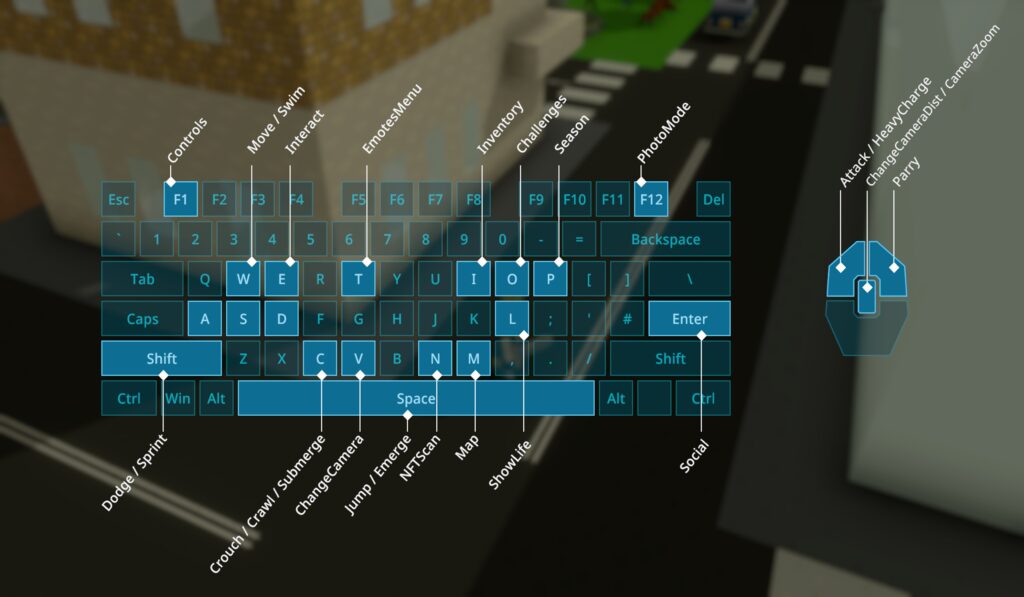
Basic Movement & Navigation
Mastering your physical flow through the diorama is the first step of your journey.
| Action | Control (Key/Mouse) |
| Move | W, S, A, D |
| Jump | Space |
| Dodge / Sprint | Shift |
| Crouch | C |
| Crawl | C & Hold |
| Sitting | X |
Combat & Interaction
Use these actions to interact with the world and face the challenges guarding the "scent of memory."
| Action | Control (Key/Mouse) |
| Interact | E |
| Attack / Heavy Charge | Left Mouse Button (Click / Hold) |
| Parry | Right Mouse Button |
System & Perspective Tools
These tools help you capture the perfect view and manage your adventure.
| Action | Control (Key/Mouse) |
| Map | M |
| Inventory | I |
| Photo Mode | F12 |
| Camera Zoom / Distance | Scroll Wheel |
| Main Menu | Esc |
| In-Game Help (Controls) | F1 |
Tips for an Immersive Experience
- The High-Altitude Gaze: When you reach the observatory deck at the top of the hotel or while you are climbing the paths of Mt. Rokko, use the Camera Zoom (Scroll Wheel) to adjust your view. Simply turning around while ascending the mountain allows you to see the city skyline tightly tucked between the peaks and the sea. This perspective captures the "vertical rhythm" of Kobe.
- A Moment of Reflection: Movement in kodiad is not just about reaching a destination. Use Sitting (X) to take a moment of reflection at the harbor or in the quiet forest areas, feeling the city's unique atmosphere.
Ready to start your journey? 👉 [Play KOBE Diorama Adventure (x=144, y=-168)]